Architecting Enterprise AI: The Lattice Platform (Part 5)

Disclaimer: This series is a personal, educational reference architecture. All diagrams, opinions, and frameworks are my own and are not affiliated with, sponsored by, or representative of my employer. I’m publishing it on my own time and without using any confidential information.
© 2026 Sean Miller. All rights reserved.
From the Action Boundary to the Read Boundary
The Tool Gateway governs what AI can do. Every lookup, refund, escalation, and write passes through a controlled execution boundary before an enterprise system is touched. That’s half the problem.
The other half is what AI can know. Before a model drafts a summary, explains a risk score, or answers a policy question, it needs context. And if that context is unscoped, over-broad, or missing a paper trail, the answer inherits those failures. Honestly, confident wrong answers feel worse than blocked tools because they look finished.
The Context Builder is Lattice’s read boundary. It retrieves approved information, redacts what the caller shouldn’t see, attaches citations, and assembles a bounded package for the model. It doesn’t invent a plan, nor does it write back to systems. It just prepares the briefing.
The Tool Gateway governs what AI can do. The Context Builder governs what AI can know.
What the Context Builder Does
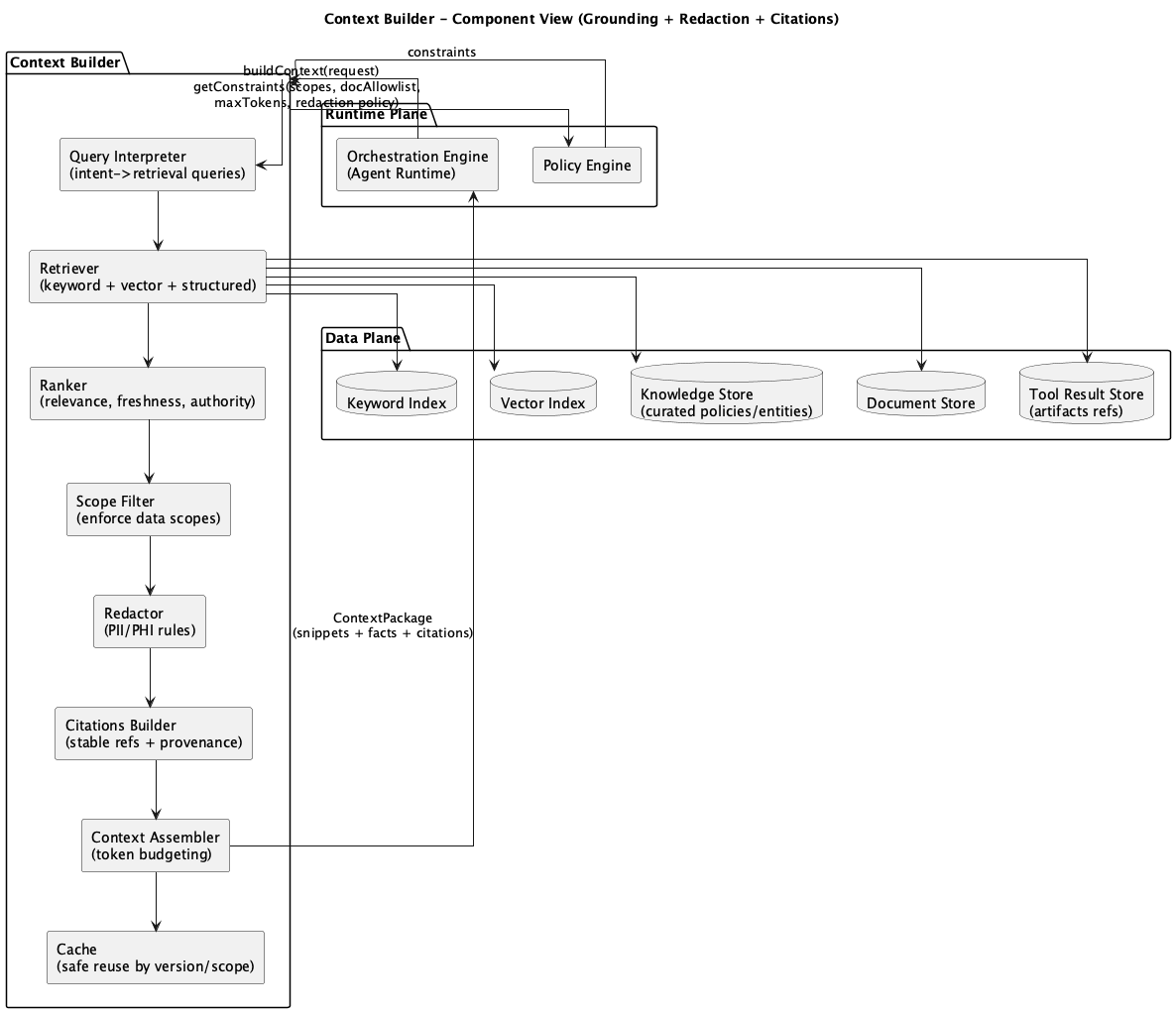 Figure 1: Context Builder Component Diagram
The Context Builder sits in the Runtime Plane between the Orchestration Engine and the Data Plane. When a workflow needs grounding, the orchestrator asks for a context package. The Context Builder builds one under a pretty explicit set of constraints: workflow, user role, data scopes, document allowlists, redaction policy, token budget.
The work itself is deliberate and fairly boring. Which is kind of the point.
Scope-aware retrieval. Fetch only from sources the caller is allowed to use. That scope applies to keyword search, semantic search, and curated knowledge.
Ranking and filtering. Prefer relevance, freshness, and authority. Drop duplicates. Respect document-type allowlists.
Redaction. Apply PII and sensitivity rules before any snippet reaches a model. The model never gets a chance to “decide” whether to hide a Social Security number.
Citation assembly. Every retained snippet gets a stable reference: document, chunk, version. Provenance travels with the package.
Token-bounded assembly. Fit the package to the budget. Enough to answer well. Not everything that exists.
Those pieces produce a package the Model Gateway can consume. Grounding becomes a platform step instead of some ad hoc RAG call buried in a prompt.
Trust Starts Before the Prompt
A common shortcut is to retrieve everything related to a case, dump it into the prompt, and add instructions like “do not share sensitive data.” That’s not a control. That’s a request.
Trust starts earlier.
If a finance document never enters the context, the model can’t cite it. If an account number is redacted before inference, the model can’t accidentally echo it. If every snippet carries a citation, a reviewer can check the claim against the source instead of just trusting the prose.
Grounding doesn’t eliminate hallucinations. Models can still misread things, overstate them, or stitch facts together poorly. What the Context Builder does is narrower, and honestly more useful: it reduces unsupported answers, keeps sensitive data out of the prompt, and makes the remaining claims inspectable. There’s a later post on preventing hallucinations that covers the broader pattern set. This one is about the read boundary that makes those patterns workable.
One Question, an Approved Set of Facts
Take a Review Workbench request for CASE-2024-001:
Summarize the key findings and risk indicators for this case.
The Orchestration Engine already authenticated the user, selected a workflow, and loaded session state. When the workflow hits a grounding step, it calls the Context Builder with the case, the role, the scopes, and the token budget.
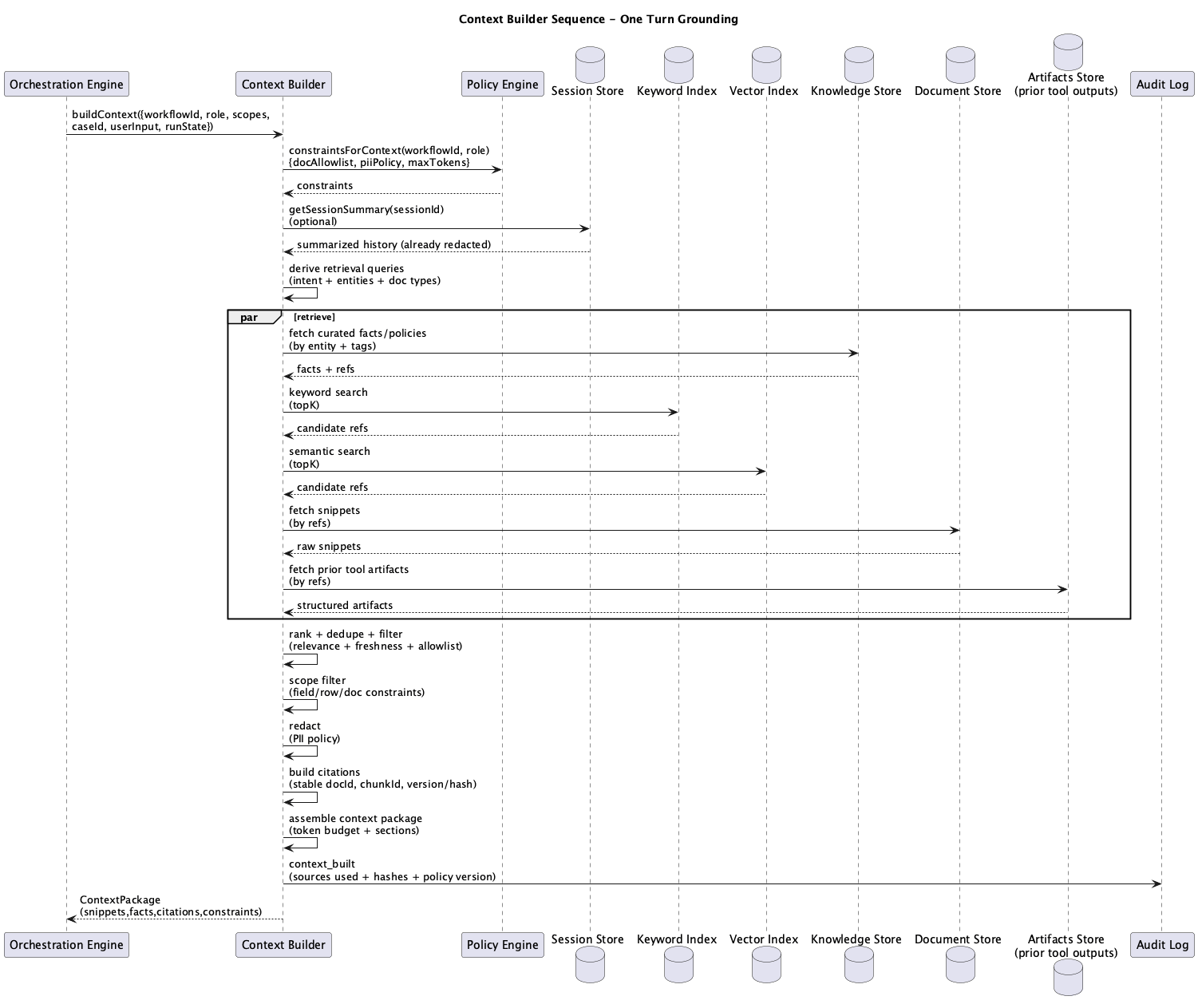 Figure 2: Context Builder Sequence Diagram for One Turn
The sequence is pretty straightforward:
- Load policy constraints for this workflow and role.
- Retrieve candidates in parallel from keyword indexes, vector indexes, and curated knowledge.
- Rank, dedupe, and filter against allowlists and scopes.
- Redact fields the caller shouldn’t see.
- Attach citations and provenance.
- Assemble a package that fits the token budget.
- Emit an audit event recording sources used and policy version.
The model never searches the company. It gets a curated briefing.
In the live demo, the “Build context” steps show this in action. Retrieval runs in parallel, sensitive details are redacted, citations are assembled, and a context package goes back to the orchestrator. The analyst sees a summary with risk indicators and source references. The platform decided which facts were eligible.
The Context Package
The Context Builder returns a contract:
{
  "chunks": 12,
  "totalTokens": 4250,
  "sources": [
    { "type": "vector", "docId": "doc-001", "relevance": 0.94 },
    { "type": "keyword", "docId": "doc-003", "relevance": 0.87 },
    { "type": "knowledge", "factId": "fact-112", "relevance": 0.91 }
  ],
  "citations": [
    {
      "id": "cit-1",
      "text": "Per policy guidelines section 4.2...",
      "source": "doc-001"
    },
    {
      "id": "cit-2",
      "text": "Risk threshold exceeded when...",
      "source": "doc-003"
    }
  ],
  "redactedFields": ["ssn", "account_number"]
}
A full package can also carry sanitized facts, small tables, constraints, and other useful context. Snippets are short excerpts the model can quote or paraphrase. Citations make those excerpts checkable. Redacted fields record what got removed. Token usage keeps the package inside budget. Constraints remind downstream components what the model is allowed to say or recommend.
The Model Gateway consumes this package. The Context Builder doesn’t generate the final answer. It prepares the only material the answer is allowed to stand on.
Same Question, Different Access
Access control at the read boundary is role-aware.
An agent and a finance user can ask the same question about the same case and get different packages. The agent gets operations and support material, with customer contact details and payment fields stripped out. The finance user gets billing and finance sources the agent never sees.
That difference happens before either model call.
Part 4 already covered field-level redaction on tool responses. That protects live system lookups on the action path. The Context Builder protects retrieved documents and knowledge on the grounding path. Same human identity, different enforcement point. Defense in depth across reads and writes.
Instructions are not a security control. Scoped retrieval is.
If a document category is outside the caller’s allowlist, it never shows up in the package. The model can’t “accidentally” surface what it never received.
Citations Are Part of the Answer
A grounded answer without citations still asks the reader to trust the model. A citation turns the claim into something a human can actually verify.
In the case summary example, a finding like “risk threshold exceeded” should point back to a specific policy section or case document. The final response can surface references like Operations Guide section 4.2, the supporting evidence document, or a prior escalation note. Reviewers stop guessing where the prose came from.
Citations also close the audit loop. The context-built event records which sources and versions entered the package. Later, when someone asks why the system said what it said, the trail is already there: request, workflow run, context package, model output.
That’s the practical meaning of trustworthy here. Not perfect prose. Traceable prose.
Explicit Non-Responsibilities
The Context Builder should not:
- Make business decisions or plan next steps (that’s the Orchestration Engine)
- Write back to enterprise systems (that’s the Tool Gateway)
- Create indexes or embeddings pipelines (that’s the Ingestion Plane)
- Expand scope silently because extra data “might help”
- Run inference or choose models (that’s the Model Gateway)
This separation keeps grounding focused. Retrieval stays retrieval. Planning stays planning. Action stays action. Inference stays inference.
Interactive Demo
Open the Review Workbench flow, play through the context steps, then drill into the Context Builder. Inspect the sources, citations, redacted fields, and token count in the returned package. That payload is basically the whole argument in miniature.
What’s Next
Next post covers The Model Gateway: the policy-aware inference interface that consumes context packages, routes model calls, enforces structured outputs, and keeps cost and reliability under control.
Series Roadmap
This series will explore each component of the Lattice architecture in depth:
- What Each Component Actually Is serves as the implementation decoder ring.
- Introduction to Lattice provides an overview of the Five Planes.
- The AI Gateway covers the front door and policy enforcement.
- The Orchestration Engine explains why Lattice uses workflows, not agents.
- The Tool Gateway covers governed access to enterprise systems.
- The Context Builder (this post) focuses on retrieval, redaction, and grounding.
- The Model Gateway will cover routing, cost control, and structured outputs.
- The Control Plane will cover policy, registries, and change management.
- The Data Plane will look at indexes, stores, and session state.
- The Ingestion Plane will cover document processing and embeddings.
- MCP Integration will explore standardized interoperability.
- Preventing Hallucinations will cover architectural approaches to grounding.
- Lattice-Lite will offer a lighter approach for small orgs.
- Putting It Together will trace the end-to-end request lifecycle.
This series documents architectural patterns for enterprise AI platforms. Diagrams and frameworks are provided for educational purposes.